Today everyone seems to have lots of different electronic devices that are in need of frequent charging. In fact, you might need an entire power strip to charge everything at the same time. However, there is a better way to keep your devices powered up while also not cluttering a desktop or nightstand with an ugly power strip and several plugs and cords. The new JOYROOM Podix Desktop Charger can charge your devices while looking nice and only taking up a small area.
What Is the JOYROOM Podix Desktop Charger?
The JOYROOM Podix Desktop Charger comes with the following:
- 1 140W 5-port GaN charger
- 1 power cord
- 1 anti-slip and magnetic silicone pad
- 1 user manual

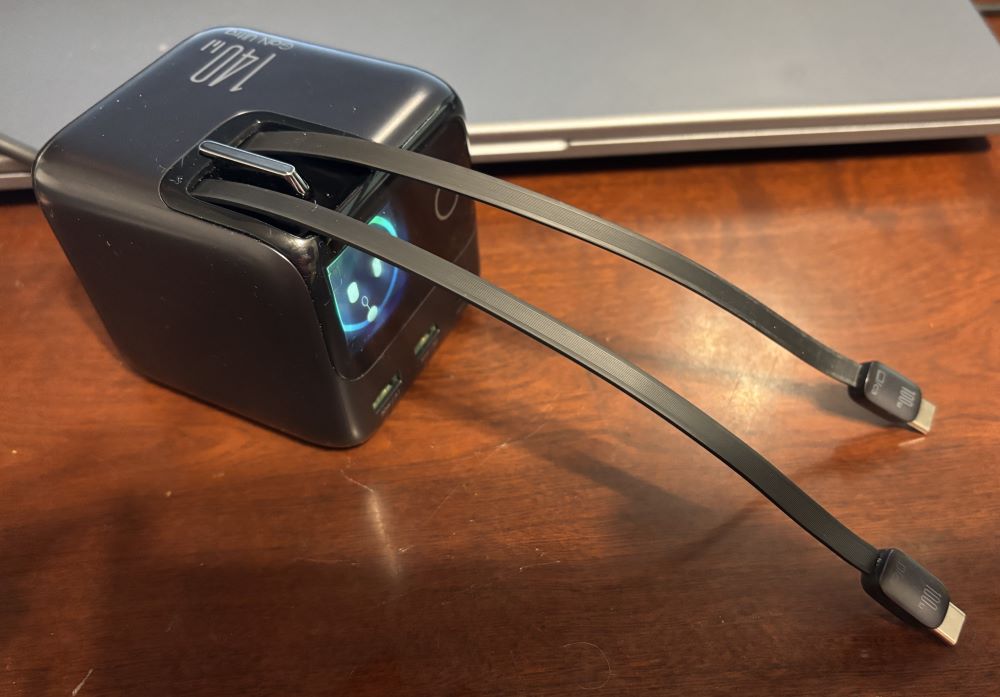
The JOYROOM Podix Desktop Charger features 2 USB-A outputs, 1 USB-C output, and two USB-C cable outputs. Each of the cable outputs are about 30 inches long. An LCD touch display shows the current power being discharged by the unit. With a tap you can cycle through two other screens. One displays animated emojis while the other shows all five ports and the power output for each of them. The Podix has a maximum power output of 140W. This can charge a 16-inch MacBook Pro to 50% in only 25 minutes. The power per output decreases as you are using it to charge multiple devices. The charger is quite compact with dimensions of 2.95 in x 2.97 in x 3.25 in and weighs only 1 lb. or 466 grams.
An anti-slip magnetic silicone pad is also included. It has a tacky bottom so it will temporarily stick to a smooth surface. This holds the charger in place. The charger can also be rotated 90 degrees in either direction so you can have the outputs the way you like it. Tapping the display button three times once rotated will align the display with the way the charger is positioned. The silicone pad can be washed as well. If dust accumulates or it looses some of its adhesive performance, you can just clean it and allow it to dry naturally and then begin using it again.

In order to prevent accidental touches, the touch control includes a 300 ms intentional delay. The display will remain on for about 30 minutes when the device is charging something if it has been touched. The display will automatically turn back on when a device is either plugged or unplugged. Another nice feature is its intelligent temperature protection. When the charging temperature becomes excessively high, the total power interface will automatically change color from a cool blue to a warm orange to alert you.

The JOYROOM Podix Desktop Charger is available from the JOYROOM store on Amazon for $79.99. This post contains affiliate links. As an Amazon Associate, I earn from qualifying purchases. However, this has not affected my honest review. Currently, JOYROOM has provided GeekDad readers with coupon code 5P83FVBV to save 15% off of the purchase price on Amazon. It is good through February 28, 2026.

Why You Should Get the JOYROOM Podix Desktop Charger
I have used several different desktop chargers over the years. I have so many devices that need power and try to avoid having lots of power cords on or around my desk. When I first opened the box of the JOYROOM Podix Desktop Charger, I expected it to be similar to my other chargers with the addition of an emoji face. However, as I looked closer, read the user manual, and began using it, I became very impressed. First off, I absolutely love the retractable USB-C cable outputs. As you pull them out from the charger, they lock into place. To have them reel back in, just pull a bit and release and they retract. There is no need to look for a USB-C cable to plug into the charger. Instead you can just use the built in cables which are basically hidden inside the charger when not in use. These are great for charging a phone, ear pods, or even batteries for video game controllers. The two cables have a 100W max so they can also be used for some smaller laptops or a Chromebook. If you need a bit more power, the built in USB-C outlet can provide up to 140W of power.

The display is more useful than I realized at first. I like that it can show how much total power is being provided as well as how much power it as each of the five outputs. I also like the ability to rotate the cubical charger. In fact, when using the cords, I can rotate it so the cords are either off to the right or left so the don’t block the display. The magnetic silicone pad is also very useful. Once it is attached to the desktop, you can pull the USB-C cords with one hand and not have to use a second hand to hold the charger in place to prevent it from sliding. Plus the pad’s adhesive bottom does not leave residue on your surface nor is it hard to remove. It has just enough stick to hold it in place. Plus it can be washed to restore the tackiness. After using this charger for a few weeks, I have found it to be my favorite and it has replaced my previous charger, taking its place on my desk and put to frequent use. If you are in need of one charger that can charge just about anything that uses a USB-A or USB-C output, then I highly recommend the JOYROOM Podix Desktop Charger.
For more information on the JOYROOM Podix Desktop Charger or to make a purchase, visit the JOYROOM store on Amazon (affiliate link).
Disclosure: GeekDad received a sample of this item for review purposes.