The Epomaker RT82 (retail price $85.99) caught my eye with the retro TV in the upper right of the keyboard. As a child of the ’90s, it immediately reminded me of the computers I learned on growing up. I was eager to understand what its purpose was and how it could add to the use of the keyboard.
Specs
- Layout: 75% compact layout (no numpad)
- Connectivity: Bluetooth, 2.4GHz wireless dongle, USB-C wired
- Battery: 4000mAh rechargeable
- Battery life: Up to 115 hours (screen and lighting off)
- Keycaps: PBT
- Lighting: Customizable RGB
- Switches: Hot-swappable
- Screen: Detachable mini display for stats, images, or GIFs
- Weight: 1.9 pounds
Unboxing
The RT82 comes with everything you need to get started, including the keyboard, detachable screen, USB-C cable, wireless dongle, a keycap/switch puller for customization, and Mac-specific keys.
Right off the bat, the keyboard’s tiny CRT-style screen gives it a playful retro aesthetic. It might be a minimalist keyboard, but it gives off big personality vibes.
Setting up the RT82 took only a few minutes. Once you connect via USB-C (wired), the 2.4GHz wireless dongle, or Bluetooth, you can press FN+S to make the keys function correctly for the Mac layout.
Epomaker RT82 Breakdown
Let’s break down the specs in basic terms.
The Epomaker RT82 is a 75% wireless mechanical keyboard with hot-swappable switches. In other words, it’s a compact keyboard with no numpad, but still includes the arrow keys and function row. You keep the important keys while also gaining extra space on your desk.
Hot-swappable switches are not soldered in, so you can pop them off and swap them with others. This feature is great for people who want to play with how their keys feel when pressed and customize them to their style. It also makes it easier for enthusiasts to experiment with different switch types to change the feel and sound of the keyboard.
Pogo Pin Mini TV Feature 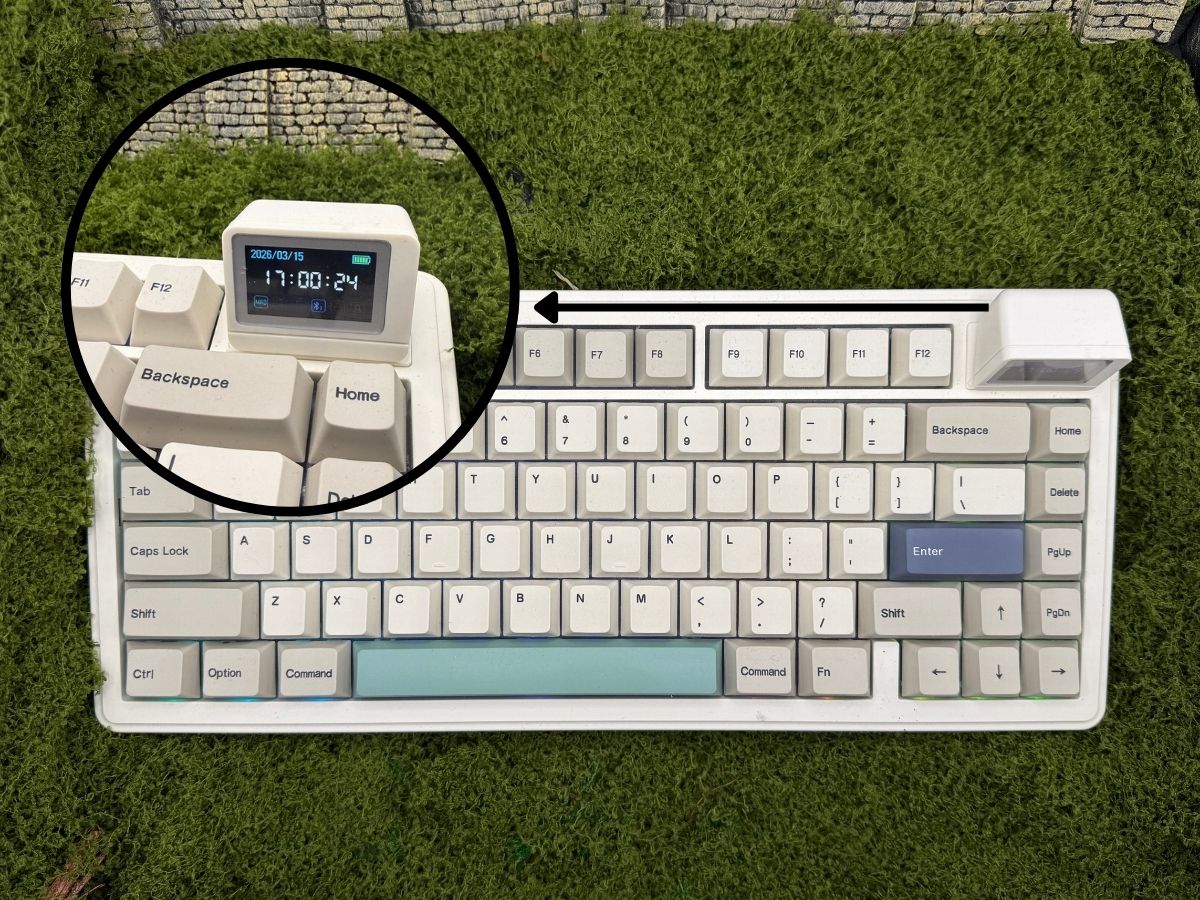
The Pogo Pin Mini TV on the upper-right of the keyboard is a standout feature of this model. It connects via magnets and can be removed easily when you don’t want to use it.
The default screen shows the time in military format, whether the keyboard is set to Mac or Windows mode, the type of connection you are on, WIN lock, and Caps Lock. Using FN+Enter, you can change the screen between the default, up to three animated GIFs/static images that you upload, and the Type-Writer mode.
To personalize it to my workflow, I found a 25-minute timer, a box breathing timer, and a cat typing on a keyboard. After you upload the images or GIFs you want, you can use FN+Enter to get into the screen and then FN+Shift to switch between the three uploads. You can design your own in Canva for free and upload them using the web interface.
If you have the coding skills, you can customize the screen more. I recommend joining the Epomaker Discord to ask for help with this one (it’s also a great place to chat about keyboards in general and get programming advice).
Typing Experience
The RT82 has a plastic casing, but it still has a good amount of weight to give it a well-built feel during use. It feels expensive with quality behind the design.
After extended writing and everyday work sessions, the RT82 remained comfortable to use. The keys feel smooth and have a gentle sound profile that is noticeable but not overly loud. Translation: if my husband is taking a nap on the couch, I can use the keyboard without worrying that it’s going to wake him up. The keys have a tactile feel and respond quickly after each tap.
My typing style has gotten me accused of trying to kill my keyboards with my speed and force. After a month of daily use, the RT82 has been holding up to my abuse well.
Functionality and Practical Use
The Epomaker RT82 offers an impressive 115 hours of use (if you keep the backlight and screen turned off). The 4000mAh rechargeable battery will provide about 15-40 hours of screen-on use.
The RGB lighting is customizable from animated color effects to static colors in various degrees of brightness. You can also turn this feature off, which is great if you work in an area where the lights could be a distraction.
The keyboard height is adjustable thanks to two built-in kickstand positions giving you a nice range of angles to work from.
I appreciate that they include the keys for Mac. Making the swap took only a second using the provided key grabber tool.
Customization Options
Customization is one of the RT82’s strongest features. Users can adjust lighting effects, swap switches, and upload images or GIFs to the small display. If you know coding, there are additional options like macros and deeper display customization available to you through the web interface.
Pros and Cons
No product is perfect. Here are a few things I liked and a few I would change.
Pros
- Easy to set up
- Retro feel gives a unique look to your desk
- Retro TV can be personalized with images and GIFs
- Budget-friendly in the mechanical keyboard world
- Plenty of customization options for beginners and expert keyboard hobbyists
- Epomaker has a Discord with an active community of users supporting each other
Cons
- Personalization can be difficult without coding skills
- Mini TV has limitations for the basic user
Who Is The Epomaker RT82 For?
The highlight of this keyboard for me is the number of customization options available. I would recommend the RT82 for anyone who enjoys customizing their tech and experimenting with different keyboard setups. The compact layout is great for writers who need more desk space and are okay with not having the numpad. If you like the look, but need the numpad, consider buying an external one like the Epomaker EK21 (retail $39.99).
Final Notes
The Epomaker RT82 is a compact keyboard that fits comfortably on almost any desk while still offering plenty of customization. The Pogo Pin Mini TV feature makes it stand out and gives the user a quick glance area for basic information or a laugh (depending on your GIF mood). The keys tap nicely and hold up under even the toughest of typists. At a retail price of $85.99, the Epomaker RT82 is a great budget mechanical keyboard for those looking for the ability to hot-swap switches with a quality build.