Manage your airline to become Portland’s favorite!
What Is PDX?
PDX is a worker-placement game for 1 to 4 players, ages 10 and up, and takes about 15 minutes per player. It’s currently seeking funding on Kickstarter, with a pledge level of $64 for a copy of the retail edition, or $84 for the deluxe edition. (There’s also a $93 “first class” pledge tier that adds some postcards and enamel pins but otherwise the same game contents as the deluxe edition.) The 15-minute estimate may be a little optimistic at least for new players; the game’s rules are actually not too complex so I think an experienced 10-year-old could handle it, but the broader strategy could still get a little tricky.
PDX was designed by Sean Wittmeyer and published by Waterworks Games, with illustrations by Skinny Ships (the design studio of Jennifer DeRosa and Richard Perez).
New to Kickstarter? Check out our crowdfunding primer.

PDX Components
Note: My review is based on a prototype copy, so it is subject to change and may not reflect final component quality. The copy I got had the deluxe wooden components; the retail edition has cardboard tokens instead of wooden tokens and meeples. The plastic tray pictured with the resource tokens is a prototype and may not be exactly the same in the finished version.
Here’s what comes in the box:
- Terminal board
- 4 Concourse boards
- 4 Worker meeples (1 per player)
- 8 Suitcase meeples (2 per player)
- 116 Service tokens (13 each in 8 types, plus 12 wild)
- 28 Activity tokens (7 each in 4 types)
- 12 Gate Upgrade tiles
- 4 Extra Gate tiles
- 72 Destination tiles (34 short haul, 18 medium haul, 20 long haul)
- 36 Amenity Office tiles
- 12 Planes (4 each small, medium, large)
- 14 Ad Campaign cards
- 4 Player Aid cards
- Solo Player Aid card
- 2 Solo dice
- Start Player token (not pictured)
- Scoresheet

The game will also include two mini-expansions: 16 Company Share cards and 10 Specialist tiles.

The artwork for PDX depicts Portland’s newly renovated airport in an infographic style that I find really charming. Skinny Ships are based in Portland and actually worked on a publication for the Port of Portland about the new terminal, so they’re the perfect design studio for this game. A couple of the box edges include the iconic Portland airport carpet pattern, and you can also spot Bigfoot making his way through the terminal.

The worker meeples look like the ground service crew, with vests and ear protection. These and the suitcases are wooden meeples both in the retail edition and the deluxe edition.

All of the resource tokens and airplanes are cardboard tokens in the retail edition, but wooden in the deluxe edition.

The player board is made to look like a concourse with three gates at the bottom, with notches for the destination ticket tiles. The wavy roof isn’t just a reflection of the actual airport—it also holds the office tiles across the top (both on the player board and the main terminal board). There are little signs throughout that are labeled in English, French, German, and Spanish, along with small reminders about things like turn order or starting setup.
The only complaint I have about the components is that some of the text is very tiny. It’s usually extra, like the non-English portions of the signs, but the player aid cards are mini cards so the text is quite small, and the setup reminder text on the main terminal board can also be a little hard to read—though since it repeats what is in the rulebook, it’s not absolutely crucial for gameplay.
How to Play PDX
You can download a copy of the rulebook here.
The Goal
The goal of the game is to score the most points by scheduling flights, running ad campaigns, and matching private office services.

Setup
On the main terminal board, stack the office tiles in 3 even stacks. Shuffle the destination tiles and make stacks of random tiles based on the number of players. Shuffle the ad campaign cards and deal one face-up to each space marked with the correct player count, and place the rest of the deck to the side. Take one of each size airplane per player, mix them up, and then place them on the runway in a line facing the right.
Set the supply of activity and service tokens nearby, as well as the gate upgrade tiles and the extra gate tiles.
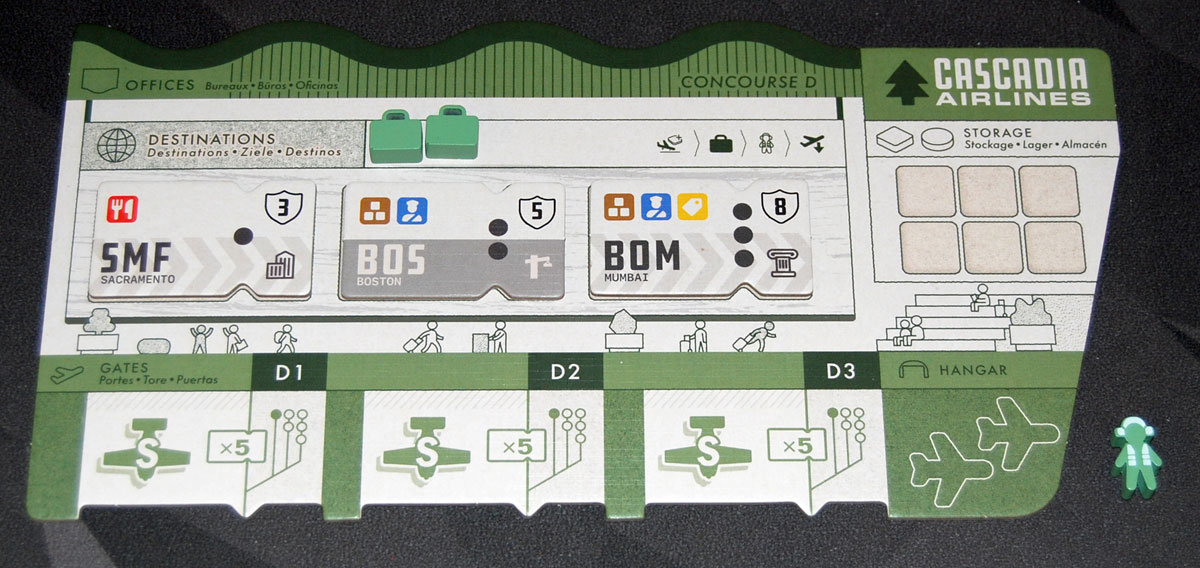
Give each player a concourse board and the matching worker and 2 suitcases. For first time players, give each player 3 random destination tickets: one short, one medium, and one long (indicated by the 1, 2, or 3 dots), which are placed in their reserve spaces.
Choose a random starting player (maybe the person who most recently packed a suitcase?).

Gameplay
There are four phases to your turn, and there are also a number of actions you can do at any time (including during other players’ turns). I’ll explain the turn phases first.

1. Land Planes: If you have any planes currently in flight, they must move down one space to the next destination ticket. The destination tickets with a grey lower half give you a bonus action to take immediately; tickets with the striped lower half give you the matching activity token. In addition, you gain one of the service tokens pictured at the top of the ticket. If a plane has no destination to land on, it is returned to the main board, at the end of the line.
2. Reclaim Suitcases: If you have any suitcases placed on the main board, you may optionally retrieve them to take those actions.

3. Move Worker: You must move your worker from its current location. The main board includes the four primary actions, or you can place your worker on an office. On the main board, you can build (and place a suitcase), reserve a ticket, lease a plane, or launch an ad campaign.

Building offers a number of options: gate upgrades, extra gates, and amenity offices. You can upgrade your gates from small to medium or medium to large. An extra gate not only gives you an additional place for more routes, but also provides two more spaces for storing resources.
Offices can be built on your own concourse board (limit three) or on the main terminal board. If you place one on the main terminal board, you immediately gain a wild token. Your private offices may be worth bonus points at the end of the game. Offices also provide a space for workers: placing a worker on an office lets you collect the two tokens pictured, and also to place a suitcase. If somebody uses your office, you also get to place one of your suitcases.
The building action on the main board also lets you place a suitcase. Suitcases may be placed on any of the four main actions on the terminal board, to be retrieved for additional actions on a future turn. (Note that suitcases do not let you place more suitcases themselves.)
Reserving a destination lets you take any face-up destination tile and place it into your reserve; you have a limit of three tickets in the reserve and you may discard tickets if necessary to make room.
Leasing a plane lets you take the plane at the head of the runway on the main terminal.

Running an ad campaign costs two or three activity tokens to take the matching ad campaign card from the market. Place the card near your concourse and then draw a new card to replace it.
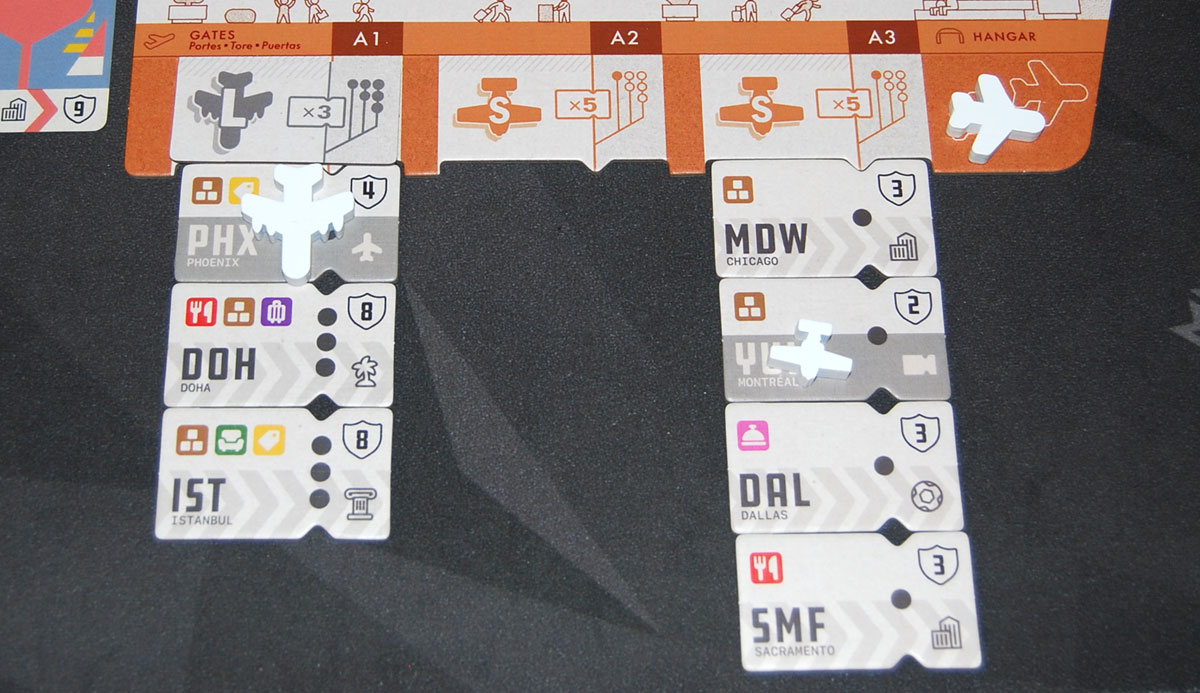
4. Schedule Flights: Finally, you may schedule flights. If you have a gate that doesn’t currently have any planes on or below it, you may place one of your matching planes onto the gate (even if it has no destination below it). Only one plane can be active at a time for each gate, and it must match the gate size.
At the end of your turn, you must discard resources that don’t fit into your storage, and you may store up to two planes in your hangar, returning any extras to the terminal board at the start of the runway.
Anytime Actions
At any time during the game, you may assign destinations, rearrange routes, and cancel flights.
Assign Destination: Pay the matching service tokens to move a destination from your reserve to a gate. Small gates may only accommodate short-haul destinations but can have up to 5 tickets below the gate. Medium gates can accommodate short- and medium-haul tickets and are limited to 4. Large gates can hold any size tickets, but are limited to 3.
Rearrange Routes: You can rearrange your assigned destination tickets however you like as long as there are no planes currently on or below them (and as long as they still fit in their respective gates). For instance, if you scheduled a flight at a gate that had no destinations, you could move one from another gate so that there will be a place for the plane to land when your next turn comes up.
Cancel Flights: You may spend one service or activity token to cancel a flight that’s in progress—just remove the plane and return it to the runway.
Game End
When three of the destination tile stacks are empty, the end game is triggered. Finish the round so all players have had the same number of turns.
Add up your score:
- Your total assigned destination tickets (tickets still in your reserve do not score)
- Your total ad campaign cards
- Private office bonuses: for each icon in your private offices, score a point for each icon on your assigned tickets that matches.
The highest score wins, with ties going to the player with the most destination tiles.
Game Variants
The solo mode has you play against “Tyler,” an automated player. The setup is for a 2-player game with a few modifications. Tyler’s actions are controlled by the two dice, taking destinations and assigning them automatically to his gates, and launching ad campaigns if he has matching icons on his destination tickets. Some dice faces will cycle a plane on the runway or build offices either on Tyler’s board or the terminal board. Your goal is to beat Tyler’s score.

The Company Shares mini-expansion included in the game gives players private objectives in the form of cards: each player gets 3 at the start of the game, and these will give you points for meeting specific conditions like having the matching icons on your destination tickets. However, each time you upgrade to a large gate, you have to discard one, so you’ll have to decide if it’s worth the trade-off for higher-scoring destinations.

The Specialist mini-expansion adds the specialist tiles. When you build, you may build one of these in your concourse instead, and each one gives you a bonus ability:
- Broker: When you lease a plane, you may take any plane from the runway instead of the first one.
- Contractor: Once per turn, when you use the build action, you get an extra build.
- Partnership: When assigning tickets, you get discounts based on icons in your private offices.
- Trader: You may trade any 2 service tokens for any 1 service token.
- Analyst: When you build an office, you may swap a specialist for another specialist, or swap tiles from your private office with offices on the main terminal board.

Why You Should Play PDX
I’ll confess: I’m a sucker for the Portland airport. It has a mini movie theater, a Powell’s bookstore, a decent food court, and the famous carpet pattern (loosely inspired by runways). I’ve even got a chair in my office that was originally from the airport, refurbished by a local furniture shop. The airport was under construction for a couple years (which was not as fun), but when it was opening up my family signed up for their “dress rehearsal” where thousands of people were assigned simulated traveler profiles and went through check-in and security to offer feedback, in exchange for a sneak peek at the new facility. So, when I heard that Waterworks Games was making a PDX airport game, I knew I had to give it a try.
I already mentioned that I love the way the game looks, but I’ll say it again. The infographic look, the little background details on the main board and the concourse, the ticket-shaped destination tiles, the runway for storing the plane supply—all of those little touches add up to a pleasing whole that captures the vibe of the Portland airport.

The gameplay is not too difficult: it’s a worker-placement game with only four main actions (the fifth, collecting resources from an office, is also very simple). There’s no blocking—you can go to any space regardless of whether there’s another player there, and the only restriction is that you can’t just stay in the same place and repeat an action on your next turn. The actions themselves are also pretty easy to understand: build a thing, take a ticket, get a plane, cash in your activity tokens for a card that’s worth points. So far, so good.
But there are some fun twists: the suitcases are essentially extra workers that will give you bonus actions, so you could take up to 3 actions in a single turn if you don’t retrieve them right away. However, the actions that let you place those suitcases tend to be those that you need earlier in the game: the build action lets you expand your gates and also build those offices that will give you end-game points; the office action gives you service tokens, but once you’ve got planes flying you’ll be able to collect those more quickly anyway. Figuring out where to stash your suitcases and when to retrieve them requires some strategy.
Another unique aspect to the game is the ability to rearrange routes on the fly. A lot of the game’s action happens when it’s not actually your turn. You gain tickets from the board during your turn but it doesn’t cost you anything until you decide to assign them to a gate—and even then you can still move them around from gate to gate as long as a plane hasn’t flown over them yet.
All destination tickets reward you with a service token, but you also get either an activity token or a bonus action. Since you can rearrange them just before you land your planes at the beginning of your turn, that gives you some opportunities to react to the current board state: lease a plane once the right one gets to the front of the line, or run an ad campaign now that the card you’ve been waiting for has just hit the market.
The one downside to the anytime actions is the same problem I’ve run into with other simultaneous-play games: when people are still learning the game, it can be harder to make sure everyone is playing correctly. If somebody is rearranging destinations that should already be locked, nobody else might notice if they’re focused on their own concourses the whole time. It can also be easy to forget about potential anytime actions; canceling a flight unlocks that route and allows for rearranging without having to wait for the plane to finish its course, but not everyone may realize that until somebody actually does it.
Because of the big stacks of offices and randomized selection of tickets, there’s no guarantee that everything is evenly distributed. In one game I played, there were almost no medium-haul flights, something that we didn’t know until near the end of the game. If any of us had upgraded two gates to large, that could have been a huge scoring opportunity, but we were all waiting for more medium tickets to be revealed. Similarly, there are some offices that have two of the same icon—if you manage to get one of those and a couple other offices with the same color, you could make that particular icon worth 4 points each … as long as those tickets actually show up in the market. There aren’t any guarantees, and it seems like there’s a bigger chance of disproportionate icons when you have fewer players and fewer tiles are used for the game.
I haven’t had a chance yet to play with the mini-expansions, but I always like personal objectives so I’m looking forward to trying the game with the Company Shares. It gives you a nudge in a particular direction, which can feel helpful for players learning a new game who aren’t sure where to start. The Specialists are also very cool, giving you some powerful abilities but at the cost of the bonus points you’d earn from your private offices.
Overall, I think PDX is a solid worker-placement game with a fun theme and a couple of twists that help set it apart. It’s not too heavy rules-wise, especially for players who already have some experience with worker-placement games. And if you’re a fan of the Portland airport, this is a connection you won’t want to miss!
For more information or to make a pledge, visit the PDX Kickstarter page!
Click here to see all our tabletop game reviews.
 To subscribe to GeekDad’s tabletop gaming coverage, please copy this link and add it to your RSS reader.
Disclosure: GeekDad was loaned a prototype of this game for review purposes.